
Sign up with an Australian mobile number · AU$28 New Member Free Gift
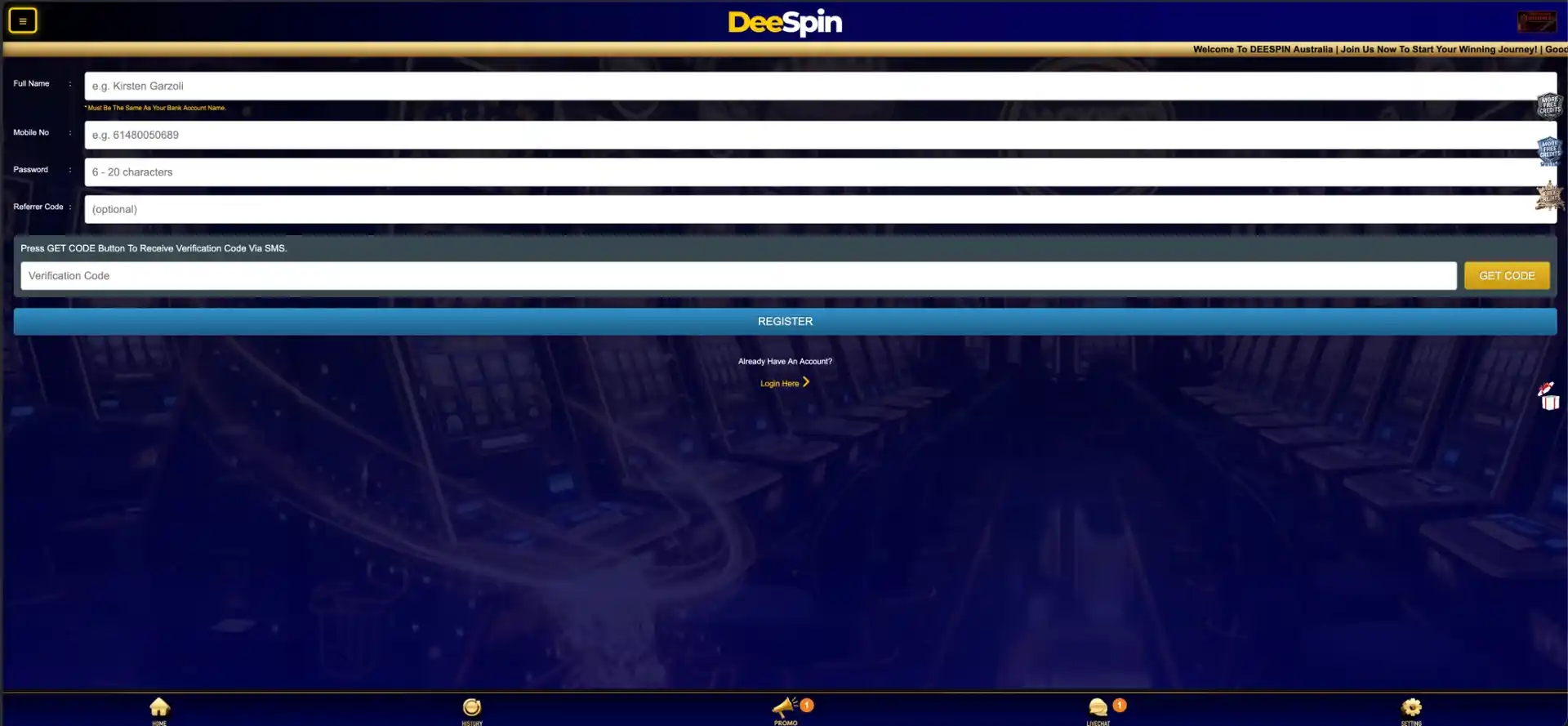
DeeSpin registration takes a few minutes and needs four details: full name, an Australian mobile number in the 61 format, a password of 6 to 20 characters and, optionally, a referrer code. The mobile number is confirmed with an SMS code, and verification unlocks the AU$28 New Member Free Gift. There is no email field and no sign-up through Google or Facebook. The full name should match the bank account that will be used later, because deposits and withdrawals are checked against it.
- Fill in the form
- Verify by SMS
- Claim the AU$28 gift
Login · No Deposit Bonus · Deposit Methods
01. Registration form
Each field of the sign-up form and what to enter:
| Field | What to enter | Required |
|---|---|---|
| Full name | Legal name exactly as on the bank account | Yes |
| Mobile number | Australian number in the 61 format | Yes |
| Password | 6 to 20 characters | Yes |
| Referrer code | Code from the member who sent the invite | No |
| SMS code | Code sent to the mobile number | Yes |
Entering the mobile number
The 61 format replaces the leading 0 of an Australian mobile with the country code. A number written locally as 0412 345 678 becomes 61 412 345 678. The SMS code is sent to this number, and the same number is used to log in later.
Choosing a password
A password of 6 characters meets the minimum, but a longer one close to the 20-character limit, mixing letters and numbers, is far harder to guess. It should not be reused from email or banking.
02. How to sign up
Registration step by step:
- Tap Register in the top navigation.
- Enter full name exactly as it appears on the bank account.
- Enter the mobile number in the 61 format.
- Create a password of 6 to 20 characters.
- Add a referrer code if a friend sent an invite; this cannot usually be added later.
- Request the SMS code and enter it to verify the number.
- Open the Promo section to find the AU$28 New Member Free Gift.
The account is ready as soon as the SMS code is accepted. Only one account per person is allowed; a second account with the same name or bank details can be closed.
03. After registration
Once the account is open, a few steps make the rest smooth:
- Claim the AU$28 Free Gift and read its balance target and cash-out cap.
- Check the Community Bonus and Facebook Instant Task cards for AU$10 credits.
- Decide on a monthly budget before the first deposit.
- Select the Slot Welcome Bonus before depositing, if it is wanted.
- Make a first deposit from AU$10 by PayID or bank transfer in the same name.
- Add the home-screen shortcut or install the app from the Download App banner.
If the SMS code does not arrive
The most common causes are a number entered with the leading 0 instead of 61, weak mobile signal or a delay at the carrier. Waiting a minute and requesting a new code usually works. If it still fails, the 24/7 live chat can check the number.
Why the name matters
DeeSpin matches every deposit and withdrawal against the registered name. A nickname, a shortened first name or a missing middle name can hold up the first payout. Entering the full legal name at sign-up removes the problem before it starts, and it cannot easily be changed later.
Who can register
DeeSpin accounts are for adults aged 18 and over with an Australian mobile number and an Australian bank account in the same name. One account per person is allowed. The details below are needed before starting:
| Needed | Why |
|---|---|
| Australian mobile number | SMS verification and login |
| Full legal name | Matching deposits and withdrawals |
| Australian bank account in the same name | Deposits from AU$10 and payouts from AU$30 |
| Referrer code, if invited | Linking to the referral programme |
Registration on mobile
The sign-up form is the same on a phone as on a computer. Registering on the phone that holds the SIM is convenient, since the SMS code arrives on the same device and many phones offer to fill it in automatically. After verification, the Download App banner or a home-screen shortcut keeps DeeSpin one tap away.
FAQ
Common questions about DeeSpin registration.
Can a DeeSpin account be opened with email?
No. Registration uses an Australian mobile number and SMS verification.
What does registration unlock?
The AU$28 New Member Free Gift after SMS verification.
Is the referrer code required?
No. It is optional and links the account to the member who sent the invite.